How to Plan a Day Trip With Bonder: Hocking Hills Comfort Food Cruise
Day trips are deceptively tricky to plan. You've got a short window, multiple stops, and a group that can't agree on anything. Whether it's a food festival, a scenic drive, or a winery crawl, the logistics pile up fast.
This walkthrough uses the 2026 Hocking Hills Comfort Food Cruise as a real example—12 restaurants, two weekends, one $20 ticket booklet. Here's how to go from finding the event to having a navigable Google Maps plan in about ten minutes.
Step 1: Find the Event Schedule
The Hocking Hills Comfort Food Cruise is an annual self-guided food tour across Hocking Hills, Ohio. The 2026 edition runs March 7–8 and March 14–15, with 12 participating restaurants. Each stop is a different comfort food bite:
| Stop | Restaurant | What You're Getting |
|---|---|---|
| 1 | Hocking Hills Bakery | Mini Cinnamon Rolls & Coffee |
| 2 | Urban Grill | Parmesan Fries with Garlic Aioli |
| 3 | Sunset Slush of Hocking Hills | Perfect Pretender Cookie |
| 4 | Home Tavern | White Cheddar Mac & Cheese with BBQ Pulled Pork |
| 5 | Inn & Spa at Cedar Falls – Kindred Spirits | Signature Berry Cobbler |
| 6 | M and M Family Diner | Cup of Homemade Vegetable Soup |
| 7 | Mam's Rusted Skillet | Mini Queso Burger |
| 8 | Chef Moe's on Main | Frickin' Chicken & Special Sauce |
| 9 | The Max Bar and Grill | Grilled Wings & Dipping Sauce |
| 10 | Amy's Simple Sandwiches | Wonkey Donkey Deviled Eggs |
The official event page lists every location. That URL is exactly what we need for the next step.
Step 2: Create a Trip and Import the Schedule
Open Bonder and create a new trip. Give it a name ("Comfort Food Cruise"), set the date to whichever weekend you're going, and add Hocking Hills, Ohio as the destination.
Then, instead of manually adding each restaurant, use Itinerary Import:
- Tap the import button inside your trip timeline
- Paste the URL of the event page:
https://www.explorehockinghills.com/festivals-events/comfort-food-cruise/ - Bonder fetches the page, parses the stops, and lays them out as a structured itinerary
- Review the extracted items, deselect anything you want to skip, and tap Import
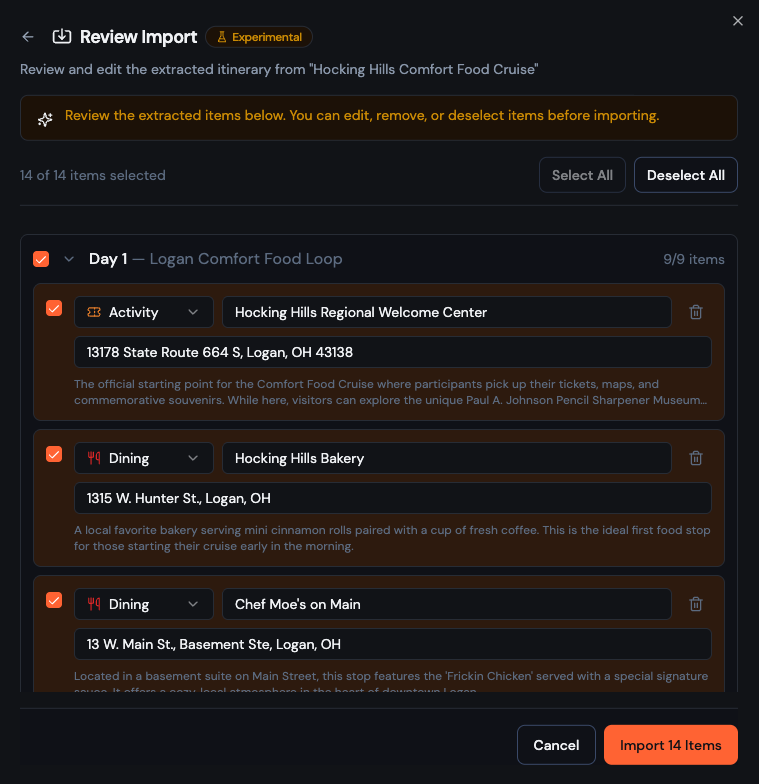
You'll end up with all the stops sitting neatly in your timeline—with names and enough context to start scheduling. From here you can drag stops to reorder them, set approximate times for each, and add notes like "skip if parking is rough" or "definitely get here before noon."
Add your travel companions and they'll see the full plan immediately.
Step 3: Export to Google My Maps
Bonder handles the planning side. But when you're on the road, you want your stops on a map you can navigate. That's where Google My Maps comes in.
From your trip in Bonder:
- Open the trip menu and choose Export
- Select Google Maps / KML format
- Save the
.kmlfile to your phone or send it to yourself
Then in Google My Maps (mymaps.google.com):
- Create a new map and name it (e.g., "Comfort Food Cruise")
- Tap Import and upload the
.kmlfile - All your stops drop onto the map as pins
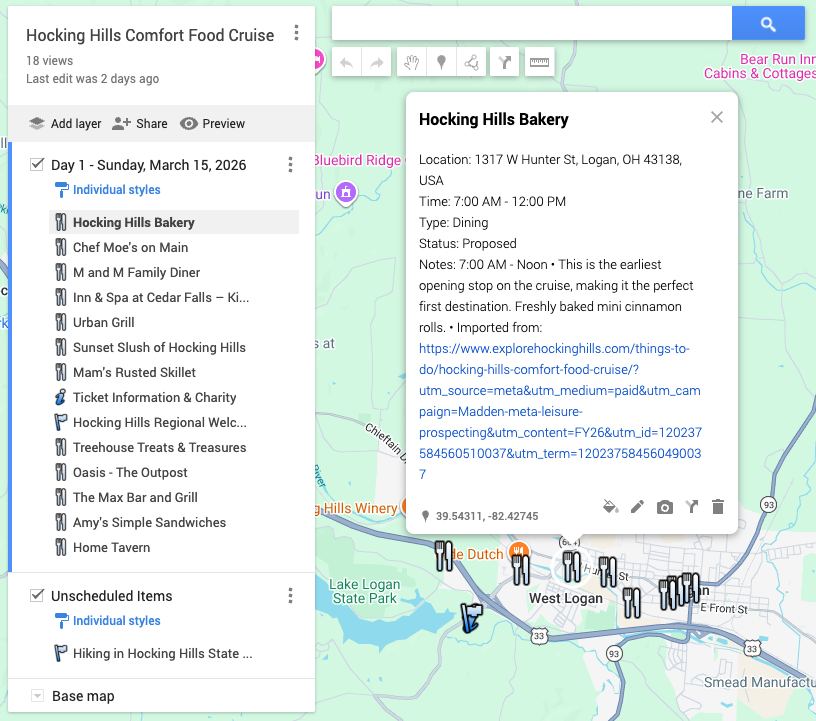
Now you've got a tap-to-navigate map of every restaurant stop. The whole group can access the map if you share the link.
Pro tip: In Google My Maps, you can color-code stops and add a driving layer to see route distance between them—useful for figuring out the most fuel-efficient order to hit everything.
Why This Works Well for Day Trips
Day trips have a different shape than multi-day travel. You're not worrying about hotels or flights—you just need a tight, shared plan you can actually follow on the ground.
Bonder handles the group coordination layer (shared itinerary, comments, everyone on the same page) while Google My Maps handles the navigation layer (tap to go, see everything on a map). Together they cover the whole problem without anyone having to build a spreadsheet.
The Comfort Food Cruise is a great stress-test because the stops are spread across the Hocking Hills area and the order you do them in affects how much driving you do. Import, reorder intelligently, export—and you're ready.
Plan your day trip in Bonder →
Planning a group trip?
Try Bonder free — the easiest way to plan trips with friends.
Try Bonder free →